Book an Appointment
Call Cottonwood Heights Computer Repair Service at 
801-679-2640
                   

(801) 679-2640

*


Cottonwood Heights Computer Repair Service has provided the best mobile computer repair in Cottonwood Heights, UT and the greater Salt Lake City Metro Area since 1999. The term "mobile computer repair" means we come to you to resolve all your computer problems.

We repair laptops, desktops, PCs and Apple computers. One of our highly qualified staff will come to you, often the same day, to take care of all your repair needs.

Why not use the #1 rated company for computer repair in Cottonwood Heights, UT?

Computer Repair 4.9 / 5 stars from 289 reviews
Why use a computer tech when you can have a Cottonwood Heights based Computer Engineer? Mon-Sun 8:00am - 8:00pm

Call us at (801) 679-2640

Text us at (801) 679-2640

Email us your questions

Book an Appointment

"Jason was courteous, knowledgeable and efficient in his work. He resolved problems with both of my laptops. The work was completed in a timely manner and charges were quite reasonable."
Cottonwood Heights Computer Repair Service 5 / 5 stars
"Matt did a great job, solved a number of my issues , would recommend him and the company."
Cottonwood Heights Computer Repair Service 5 / 5 stars
"Ben is great at what he does. He was able to find out my problem within minutes. Great service and highly recommended!!!!"
Cottonwood Heights Computer Repair Service 5 / 5 stars
"Taylor was most helpful. Thorough and knowledgeable, 5 stars all the way."
Cottonwood Heights Computer Repair Service 5 / 5 stars
"I had the greatest experience with the technician. My computer is running better than it ever has. I had to get a new hard drive and he was able to ensure all my files came over and I did not lose anything. I am 1000% satisfied. He was awesome. He was very knowledgeable and personable. I would give him 100 stars."
Cottonwood Heights Computer Repair Service 5 / 5 stars

Who is Cottonwood Heights Computer Repair Service?

Cottonwood Heights Computer Repair Service is owned by Matt Karls, an Electrical Engineer and a Computer Systems Engineer. We are a team of computer professionals focused on service and quality, all our work is guaranteed.

If you have any computer, technology or IT problem in Cottonwood Heights, UT we can fix it. We have been performing computer repair in Cottonwood Heights full time since 1999. Feel free to give us a call or text us at (801) 679-2640.

Cottonwood Heights Computer Repair Service's Computer Engineer

What is your Service Area for on-site Computer Repair?

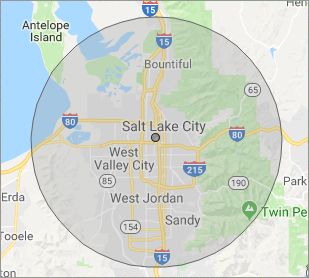
Our primary on-site mobile service areas include the greater Salt Lake City metropolitan area and the Phoenix, Tucson, Las Vegas and San Diego metro areas.

We provide remote and mobile computer repair in Cottonwood Heights, Bluffdale, Bountiful, Centerville, Draper, Farmington, Herriman, Holladay, Kearns, Magna, Midvale, Millcreek, Murray, North Salt Lake, Riverton, Salt Lake City, Sandy, South Jordan, South Salt Lake, Taylorsville, West Jordan, West Valley City and Woods Cross.

Our on-site Computer Service Area

What should someone expect that hires you for Computer Service?

Our mission is to fully resolve your computer problems quickly and affordably. If you want a Computer Engineer that can fix all of your computer problems instead of a computer tech, a computer geek, a technician or a computer guy that can only fix some of your problems; call us at (801) 679-2640.  

What types of Computer Services do you perform?

We service businesses and business clients in their homes, including:
 
  • Diagnose / repair hardware or software problems
  • Spyware, malware, trojan and virus removal
  • Setup wireless and small business networks
  • Laptop repair, PC repair and Apple repair
  • Hard drive data recovery

Cottonwood Heights Computer Repair Service Contact Information

Cottonwood Heights Computer Repair Service
(801) 679-2640

Cottonwood Heights Computer Repair Service is a Karls Technology company

* *
*
*
*
  *
* *


*
*
* * * * * * * * * * * * * * *
4.9 / 5 stars from 289 reviews

"I had a major computer failure that I couldn't resolve. As it might have been a hardware conflict, I wanted a tech to check out the system at home with everything connected. Taylor came out actually ahead of schedule, ran the diagnostics and the issue was resolved. I couldn't be happier with the service and professionalism. Thank you."

Cottonwood Heights Computer Repair Service 5 / 5 stars

"Matt was excellent. He explained my problems in a way I could understand and fixed them all! I would highly recommend this computer company."

Cottonwood Heights Computer Repair Service 5 / 5 stars

"Excellent, all is working, thank you."

Cottonwood Heights Computer Repair Service 5 / 5 stars

"Ben came out to help us with our laptop after we had an issue with a virus and he was very helpful and informative on the matter. He was very respectful and kind in our home. Glad we put our trust in him, would recommend to friends and family!"

Cottonwood Heights Computer Repair Service 5 / 5 stars
Best Antivirus Software of 2026: The Ultimate Guide to Cybersecurity Brands

In 2026, the digital threat landscape has shifted. We are no longer just fighting simple viruses; we are defending against AI-generated phishing, sophisticated ransomware-as-a-service, and complex identity theft. Choosing the right antivirus brand is no longer optional—it is the foundation of your digital life. At Karls Technology, we’ve analyzed the top-performing security suites of the […] The post Best Antivirus Software of 2026: The Ultimate Guide to Cybersecurity Brands appeared first on Computer Repair Blog.

Temporary Files on Windows OS

A temporary file is a file that is made to hold data while another file is being made or updated. The temporary file (also known as a temp file) is deleted after the program has been closed. Temporary files can be used for a wide variety of purposes, from storing and transferring data to handling […] The post Temporary Files on Windows OS appeared first on Computer Repair Blog.

Helpful Tip: Free Up Space on PC

Media files are the biggest space hogs on a computer’s hard drive. It is suggested to put them away temporarily. Files can be stored in the cloud using OneDrive, a feature built into Windows 10 and Windows 11. The cloud storage space provided by OneDrive makes it simple to copy large files off your local […] The post Helpful Tip: Free Up Space on PC appeared first on Computer Repair Blog.

Performance Boost by Disabling Memory Integrity

Consumers using Intel’s discrete graphics processor units for personal computers have seen a noticeable performance boost after disabling certain security safeguards. Disabling Windows 11’s Memory Integrity setting is required to increase performance. However, it’s important to remember that, according to Microsoft, Memory Integrity ensures that only trustworthy drivers are installed into the operating system, making […] The post Performance Boost by Disabling Memory Integrity appeared first on Computer Repair Blog.

What is the Three Finger Salute from Microsoft?

The Three Finger Salute is terminology for the Ctrl+Alt+Del keyboard shortcut established by IBM PC co-creator and engineer David Bradley. It’s common practice to use the three keys whenever a PC fails to load Windows or gets stuck during the boot process. You can lock the computer, switch users, log out, open the task manager, […] The post What is the Three Finger Salute from Microsoft? appeared first on Computer Repair Blog.

Windows Search Tool

Windows search is the most efficient method to utilize when looking for certain files, documents, or applications using a keyword. As a short cut, it gets the job done well. Windows 11 systems use a “magnifying glass” symbol for Windows Search on the taskbar, while Windows 10 computers feature a search box. If you type […] The post Windows Search Tool appeared first on Computer Repair Blog.

Benefit of Reducing Amount of Tabs and Windows on PC

The processing power of your computer is shared by all of the apps you run. If you’re trying to execute software and it’s taking a long time, you should be patient. If your computer freezes for a minute, you should not instantly press the power button to shut it off. Trust your instincts about whether […] The post Benefit of Reducing Amount of Tabs and Windows on PC appeared first on Computer Repair Blog.

New Feature for AirTags

Apple is currently working on an additional feature on Find My to allow AirTags to “chirp”. This is a small, but important accessory to their product. According to sources from 9to5Mac, AirTag and a few other third-party devices allow you to “ping” an accessory with a sound. With this revision, the same function will be […] The post New Feature for AirTags appeared first on Computer Repair Blog.

Turn off Fluent Design to Increase Performance

Windows 10 has a lot of visual effects, like animations, shadows, and more advanced effects, which are part of the Fluent Design language on Windows 10. The Fluent Design, while creates a more modernized look, could slow down your computer. Thankfully, you can turn these effects off, though, to make Windows 10 feel faster. In […] The post Turn off Fluent Design to Increase Performance appeared first on Computer Repair Blog.

Remove Tips and Tricks Recommendation

Users want to get the most out of their Windows 10 PC. Microsoft keeps tabs on your activity and suggests new features and settings. Windows’ ability to track your activity and provide tailored suggestions could reduce performance. To speed up the process, instruct Windows to cease making Tips and Tricks recommendations. Start by selecting the […] The post Remove Tips and Tricks Recommendation appeared first on Computer Repair Blog.